
Cheque preparation and printing workspace

Create, Manage & Print Cheques with Precision

Set up your banks and cheque templates once, prepare cheques quickly, print with accurate alignment, and keep every cheque organized in one workspace.

  • Reusable bank profiles and payees
  • Templates with positioned cheque fields
  • Preview and alignment controls
  • Print confirmation and history
app.chequepilot.com

Cheque details

Payee ABC Trading LLC

Date 05 Oct 2026

Amount AED 2,450.00

Bank Main Bank

Preview · cheque template

Pay to ABC Trading LLC
Amount Two thousand four hundred fifty dirhams only
AED 2,450.00Signature
Details to previewReady to Print

Workspace / Cheques

Prepare a cheque

New Cheque

Live preview

Main Bank · Cheque template

CHEQUEDATE  05 / 10 / 2026
Pay toABC Trading LLC
AmountTwo thousand four hundred fifty dirhams only
AED 2,450.00
Signature
Preview only · example details Print-ready layout
Bank profiles
Saved payees
Reusable templates
Preview before printing
Print history
Built around the cheque workflow

Practical tools for preparing and printing cheques

Use connected bank, payee, template, preview and history tools for the work ChequePilot is designed to handle.

CHEQUE PREPARATION

Set up the details once. Reuse them as you work.

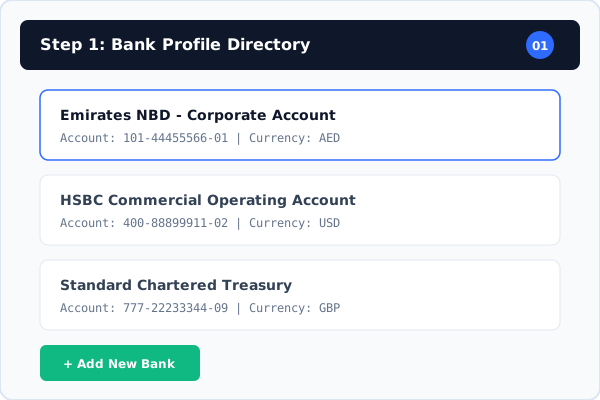
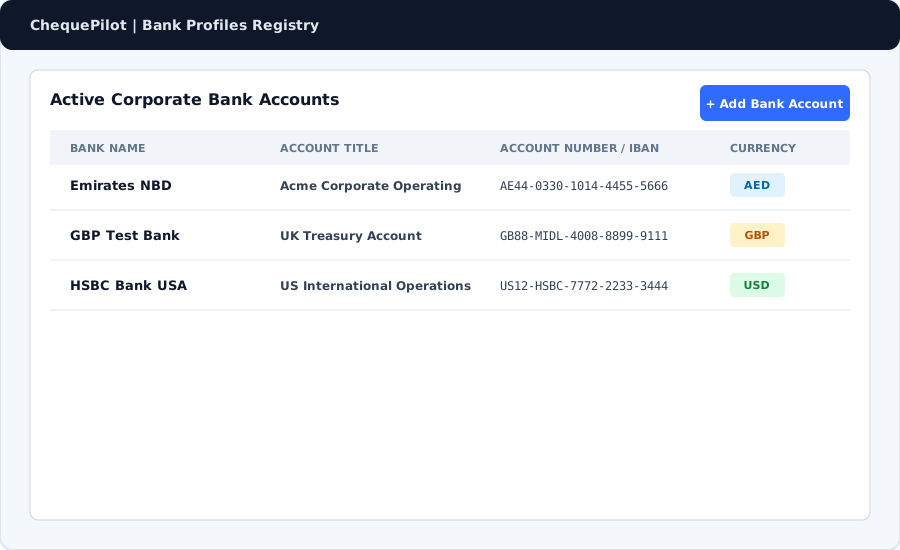
  • Bank and account profilesKeep cheque account details available when selecting the bank for a cheque.
  • Saved payeesChoose a saved recipient or add payee details while preparing a cheque.
  • Reusable cheque templatesDefine a cheque layout, its physical dimensions and printable field positions.
  • Cheque details and statusEnter date, payee, amount, amount in words and reference, then save as draft or ready to print.
PRECISION & PRINTING

Review the layout before it reaches the printer.

  • Cheque previewReview the populated cheque layout before printing.
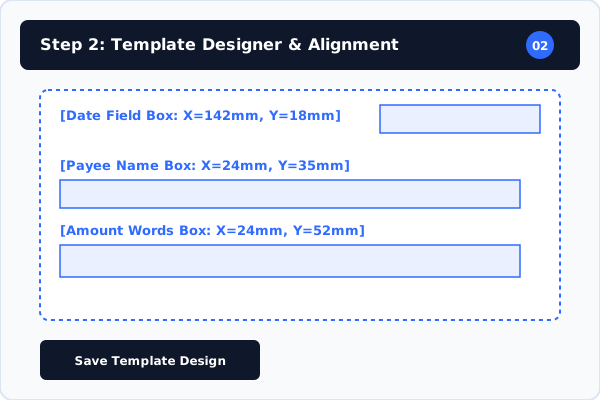
  • Field placement and dimensionsPosition cheque fields against your saved layout and cheque dimensions.
  • Printer alignment controlsUse horizontal and vertical print offsets when a printer needs adjustment.
  • Print confirmationConfirm a printed cheque or choose to reprint from the workflow.

RECORDS & WORKSPACE

Keep cheque work organized in one place.

  • Cheque historyReturn to cheque records and review their saved status.
  • Find existing recordsSearch and filter cheque records from the workspace register.
  • Reusable setupKeep bank profiles, payees and cheque templates available for future work.
  • Workspace-based recordsKeep the cheque workflow and its supporting setup together in a workspace.
How ChequePilot Works

From Setup to Printed Cheque

ChequePilot guides you through the complete cheque workflow — from setting up your bank and cheque template to preparing, printing and confirming every cheque.

SETUP

Prepare your workspace

Set up the information and layout you will reuse.

BankPayeesCheque Template
  1. 01

    Add Your Bank

    Create the bank and account profile used for cheque printing.

  2. 02

    Save Beneficiaries & Payees

    Keep frequent recipients ready to select when preparing a cheque.

  3. 03

    Set Up Your Cheque Template

    Add the layout, define its dimensions and position printable fields.

PREPARE

Build and review the cheque

Choose the right details, then check the layout before printing.

  1. 04

    Create New Cheque

    Start a record for the cheque you need to prepare.

  2. 05

    Choose Bank & Account

    Select the bank profile for this cheque.

  3. 06

    Select Cheque Template

    Load the matching saved layout.

  4. 07

    Select or Add Payee

    Reuse a saved recipient or enter a new one.

  5. 08

    Enter Cheque Details

    Add date, amount, words, reference and configured signature.

    DatePayeeAmountAmount in WordsReference / MemoSignature
  6. 09

    Preview & Align

    Review field positions and adjust print offsets if needed.

  7. 10

    Save / Mark Ready

    Keep the cheque as Draft or move it to Ready to Print.

    Draft Ready to Print
  8. 11

    Final Review

    Check the bank, payee, amount, date and template.

COMPLETE

Print and keep the record

Confirm the result and keep the cheque status with its history.

Print · Confirm · History
  1. 12

    Print the Cheque

    Send the reviewed cheque layout to your printer.

    Ready to PrintPrinting…Printed
  2. 13

    Confirm the Print

    Confirm a successful print or choose to reprint.

    Yes, Confirm PrintedReprint
  3. 14

    Keep the Record

    Return to the saved cheque history when needed.

    ABC Trading LLCAED 2,450.00Printed · 05 Oct 2026 · DemoCheque history

A clear record after printing

Flexible & Transparent Pricing

Simple Plans for Every Cheque Printing Need

Explore template design, printer calibration, and multi-bank management.

Monthly
Annual Billing

Subscription Plans Synchronizing

Visit our pricing page or contact sales to view available subscriptions and start your free trial.

Video Guides & Tutorials

Learn ChequePilot Step by Step

Watch short tutorials to set up your account, create templates, calibrate your printer, and print cheques confidently.

1. Getting Started with ChequePilot
Coming Soon3 mins
Getting Started

1. Getting Started with ChequePilot

A quick overview of the application and the recommended setup process for new users.

Watch Preview→
2. Adding Your First Bank Account
Coming Soon4 mins
Bank Setup

2. Adding Your First Bank Account

Learn how to add bank details, currencies, and account numbers to your workspace profile.

Watch Preview→
3. Creating a Cheque Template
Coming Soon5 mins
Template Designer

3. Creating a Cheque Template

Step-by-step guide to uploading cheque images and configuring bank-specific layouts.

Watch Preview→

ChequePilot Blog

Practical notes for cheque workflows

Read the latest published guidance and product updates.

View Blog
Frequently Asked Questions

Questions about cheque preparation

A few practical details about using ChequePilot.

ChequePilot helps you organize bank profiles and payees, set up cheque templates, enter cheque details, preview the layout, print and keep a record of the result.

Contact

Need help with ChequePilot?

Reach the team through the support contact details or send a message from the contact page.

ChequePilot

Make your next cheque easier to prepare

Set up your bank and template, prepare the cheque, review the preview and keep its print record in your workspace.